Nintendo Switch’s handheld-first design means it lives a rougher life than a stationary console — tossed in bags, used on couches, passed between hands — which makes a handful of accessories feel less optional and more essential. From a sturdier controller to basic drop protection, here’s what consistently shows up in Switch owners’ setups in 2026.
Joy-Cons are famously comfortable for short sessions but can feel cramped during longer play, which is the single biggest complaint accessory makers address. Beyond comfort, protection (screen protectors and cases) and storage (microSD expansion) round out the accessories most owners end up buying within the first few months of ownership.
Whether you own an original Switch, a Switch Lite, or the newer Switch 2 also changes which accessories actually fit — cases, screen protectors, and even some grips are sized for a specific model, so double-check compatibility against your exact hardware revision before buying rather than assuming “Switch accessories” are universally interchangeable.
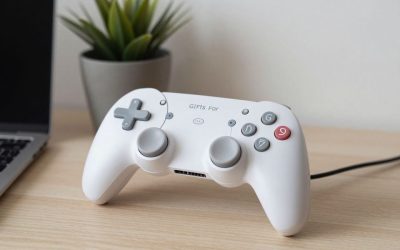
Nintendo Switch Pro Controller
Nintendo Switch Pro Controller
The official, frequently recommended upgrade from Joy-Cons: a traditional gamepad shape with tighter, more precise thumbsticks, plus rumble and motion controls carried over from the Joy-Con experience. For docked play especially, this is the controller most owners end up reaching for over the Joy-Cons.
Hori Split Pad Pro
A Joy-Con replacement built for handheld comfort specifically, with full-size sticks and a wider grip than stock Joy-Cons. If most of your play happens undocked and your hands cramp up during longer sessions, this solves that directly rather than just adding features you may not need.
SanDisk MicroSD Card for Nintendo Switch
Digital game libraries fill up Switch’s limited internal storage fast, and officially licensed SanDisk cards remain a consistently recommended, reliable way to expand it without compatibility headaches. A straightforward, low-risk purchase for anyone buying digital over physical games.
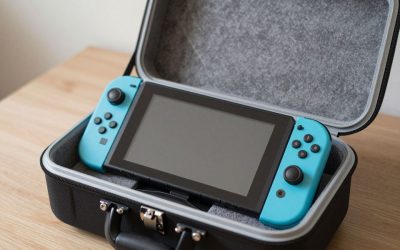
Orzly Carrying Case
A well-regarded protective case for travel and storage, with a model specifically designed to fit newer Switch hardware. If your Switch travels with you regularly, a dedicated case is cheap insurance against scratches and drops in a bag.
Spigen Tempered Glass Screen Protector
A simple, inexpensive way to prevent scratches on a screen that gets touched, bumped, and set down on surfaces constantly in handheld mode. It’s one of the cheapest accessories on this list and arguably one of the most commonly recommended first purchases for new Switch owners.
Satisfye ZenGrip Pro Case
A console-cradle case that wraps around the Switch’s console body (with Joy-Cons attached) to add ergonomic grip handles, addressing the same hand-cramping complaint as the Hori Split Pad Pro but without replacing the Joy-Cons themselves. A good option for players who want more comfortable handheld grip while keeping the stock Joy-Con controls and motion features intact.
Frequently Asked Questions
Is the Pro Controller worth it if I mostly play handheld?
Less so — the Pro Controller is built for docked, TV-style play. For handheld comfort specifically, a Joy-Con replacement grip like the Hori Split Pad Pro is the more relevant upgrade.
What microSD capacity should I buy?
128GB is a reasonable minimum for a handful of digital games; 256GB to 512GB gives more comfortable room if you buy digital regularly and don’t want to manage storage constantly.
Do third-party Joy-Con replacements work as well as Nintendo’s own?
Quality varies a lot by brand — well-reviewed options with Hall Effect sticks avoid the drift issues some original Joy-Cons became known for, but unverified budget knockoffs can be hit-or-miss on button feel and long-term reliability.
Is a dock accessory worth buying separately from the one included in the box?
Mainly useful if you want a second dock for a different room (like a bedroom TV) without constantly moving the original — official or well-reviewed third-party docks both work fine for this secondary-location use case.
JETech Dockable Case for Nintendo Switch
A slim protective shell designed to stay on the console even while docking it, unlike bulkier full-coverage cases that need to be removed first. A practical middle-ground option for players who want daily scratch protection without the extra step of removing a case every time they dock for TV play.
Do I need a separate case if I already have a carrying case for travel?
They solve different problems — a dockable shell case protects the console during daily handheld use, while a padded carrying case protects it (and accessories) during transport in a bag. Many owners use both together.
Are Joy-Con straps still necessary with newer Switch models?
They remain a cheap, sensible addition for active or motion-heavy games (tennis, boxing-style titles) regardless of Switch generation, since the core risk — a Joy-Con slipping out of hand during vigorous movement — hasn’t changed across hardware revisions.
Is it worth buying a second charging cable or dock for a second room?
If the Switch regularly moves between a living room and bedroom setup, a second official or well-reviewed dock removes the daily hassle of unplugging and relocating cables — a small convenience upgrade that pays off quickly for frequent dockers.
Final Thoughts
Start with a screen protector and case — cheap, essential protection most owners wish they’d bought on day one. Add a Pro Controller for docked play or a Split Pad Pro for handheld comfort depending on how you actually play, and expand storage with a SanDisk microSD card once your digital library grows.
Write Your Review
No reviews yet. Be the first to share your experience!